


Food Stylist - Design Game
4.41.26K Reviews
App Specs
- Version
- 1.0.105
- Updated On
- License
- Free
- Downloads
- 1,000,000+
- Developer
- zeste
- Categories
- Casual
- Platform
- Android
Screenshots

 Analysis by AppCompare
When I first tried Food Stylist - Design Game, I expected a quick way to arrange attractive plates. What stood out was how much the appeal depends on small choices: moving an ingredient a little, weighing a busy arrangement against a cleaner one, and deciding whether the table setting supports the food or distracts from it. It suits a quiet break when I want something visual and low-pressure, though it is less satisfying if I’m looking for a traditional game with a complex story or a demanding skill curve.
Get Ready to Play with Your Food
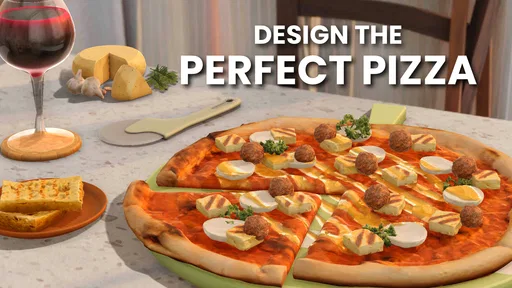
The core idea is simple: build food scenes and tablescapes by choosing items and arranging them to look appealing. That makes this a casual design game rather than a cooking simulator. I’m not following recipes or managing a kitchen; the pleasure is in composition. If you enjoy food photography, arranging a table for guests, or browsing polished meal pictures, the creative premise is easy to understand without a long learning period.
Where a design can get stuck
At first, the freedom to place and adjust objects can make a scene feel more fiddly than expected. A plate may look crowded even when every item is attractive on its own, and a small shift in position can change the balance of the whole image. I’ve found it helps to begin with the main dish, then add supporting items gradually instead of filling the available space straight away. That gives the composition a clear focal point and makes it easier to spot what is throwing it off.
It is also worth treating each challenge as a brief, not just a chance to use every appealing ingredient. When a task has particular requirements, I focus on those before experimenting with extra decoration. This is a practical way to avoid spending time polishing a scene that doesn’t fit the prompt. If an arrangement feels wrong, I pause and remove one element rather than endlessly nudging several things at once; simplifying often reveals the problem faster.
Designing Your Culinary Masterpiece
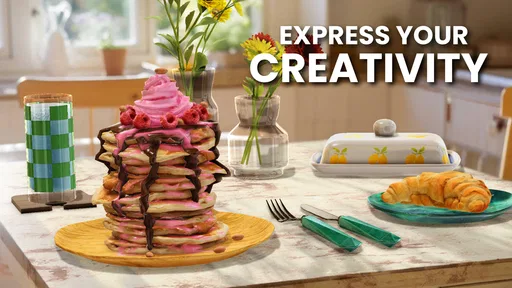
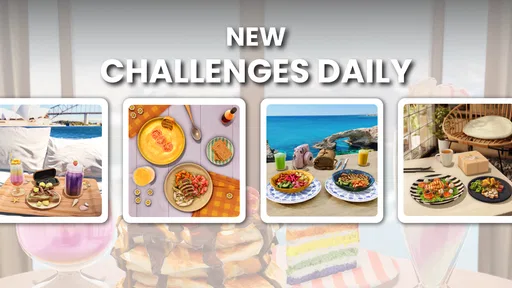
Once you dive into the app, you’re greeted with a variety of challenges. These range from designing a breakfast spread to crafting a luxurious dinner plate. Each challenge comes with specific requirements, making it a real test of your food styling skills. The fun part? You’ve got a vast pantry filled with ingredients and decor to work with.
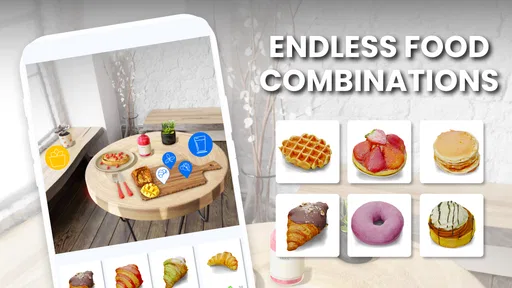
The interface is super intuitive. You drag and drop items, rotate them, and even adjust their size to get that perfect composition. Trust me, you’ll find yourself obsessing over the smallest details, like whether the parsley should be left or right of the lemon wedge.
That hands-on placement is where the game works best for me: it turns a vague idea of “make this look nice” into a series of visual decisions. One useful approach is to keep the plate’s edges and the surrounding table in mind together. A dish can look balanced on its own but feel lost against its setting, while a quieter background can make a colorful centerpiece stand out. I try a simple arrangement first, then add a garnish or table detail only if it helps the overall scene.
Worth Reading Before You Choose

EA SPORTS FC Mobile 26 Is a Bigger Football Game, but It Takes Time

Flipboard Shows What News Apps Must Do Beyond the Feed

Switching to Android Auto Means Rethinking Your Driving Routine

Google Calendar Makes a Crowded Week Easier to Manage

Ludo King Makes the Most of the Minutes Between Plans

Baby Panda World Brings Quick Play to Modern Phones, but Its Game Library Feels Busy
Setup checks before settling in
The game is free to download, and it is rated Everyone 10+. It was released on August 22, 2022; the current version is 1.0.99, and it requires Android 7.0 or later. It is made by zeste, has an average rating of 4.5 from around 19,000 ratings, and has been installed over a million times. Those details make it easy to judge whether it fits your device and comfort level before you start.
Because the game is so visual and involves precise dragging, a comfortable screen and a few uninterrupted minutes make a noticeable difference to the experience. If an item seems awkward to place, I first check whether I’m trying to make too many adjustments in one pass. Moving one object at a time gives me a clearer sense of what changed. For general hiccups, closing and reopening the game or checking that the app is up to date are sensible first steps; they don’t require guessing at special settings.
Unlocking New Styles and Ingredients
As you progress, you unlock more ingredients and styles, which keeps the gameplay fresh and exciting. This is where the game gets seriously addictive. You start with basic items like eggs and bacon, but soon you’re moving onto exotic fruits and gourmet cheeses.
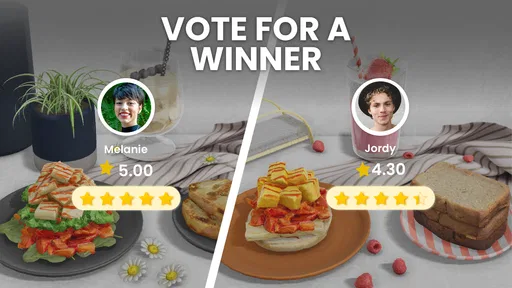
There’s also an element of competition. You can compare your creations with other players and climb up the leaderboard. It’s a great way to get some inspiration and maybe a little envy when you see someone’s perfectly styled sushi platter.
Unlocking new choices gives the creative loop a reason to continue, but it also creates a trade-off: having more options can make a design harder to focus. I get better results when I decide on a mood first—bright breakfast, relaxed dinner, or something more elaborate—and select items that support it. That keeps the growing pantry from turning every challenge into a hunt for the most eye-catching object. If I’m short on time, I stick to a small palette and save experimentation for a session when I can linger.
Workflow recovery and spending choices
When a design isn’t coming together, I treat it like a draft rather than a failure. I remove the least useful decoration, check the main dish’s position, and rebuild outward. This is more reliable than changing several parts at once, because I can see which adjustment actually improves the scene. It is also a good way to learn what kinds of arrangements I personally prefer, even when a challenge encourages a different look.
There are in-app purchases, with items priced from $0.99 to $99.99. I’d approach them as optional rather than necessary: the game is free to start, and the basic appeal is the act of arranging food and decor. If you are tempted to pay to move through progression faster, it is worth asking whether you enjoy the creative process itself. Players who mainly want a broad selection immediately may find the purchase options appealing; those who prefer a relaxed, gradual unlock pace can simply play without making a purchase.
Visuals and User Experience
The graphics are top-notch. Each ingredient looks good enough to eat, and the attention to detail is impressive. The app runs smoothly, with no glitches or lags that I noticed. The developers have done a fantastic job of making everything look as realistic as possible, which is essential for an app focusing on visual appeal.
That polished presentation is a strength, but it also points to the game’s limits. The satisfaction comes mainly from looking at and refining a finished arrangement, so anyone who wants active action, deep resource planning, or a narrative to follow may run out of reasons to continue. Compared with a standard puzzle game, it asks less of your reflexes and more of your eye for balance. Compared with a free-form drawing app, it gives you a food-focused setting and guided challenges, but not the same open canvas for making anything you can imagine.
When the app may not be the cause
If a session feels sluggish or a touch doesn’t seem to register, I wouldn’t immediately assume the design itself is broken. Small objects and fine adjustments are simply easier when I’m not rushing or tapping imprecisely. I try a slower drag, make one change at a time, and restart the app if the issue persists. If other apps are also behaving poorly, the device or connection may be a more likely source of trouble than this game; basic checks such as freeing up device resources or reconnecting are reasonable before drawing conclusions.
The community and competitive elements can add motivation, but they may not be the right reason to play. I enjoy comparing styles when I want inspiration, while someone who dislikes leaderboards or social sharing can focus on the solitary design side. A realistic use case is a short evening break: choose one challenge, arrange a dish, and stop when the composition feels satisfying. It also works for a longer session if you like revisiting details, although the same visual loop may feel repetitive if you need frequent changes in mechanics.
Connecting with the Community
One of the coolest features is the community aspect. You can share your designs with friends and other players, getting feedback and tips. It’s like having a mini food stylist community at your fingertips, ready to critique or praise your latest creation.
Plus, the app regularly hosts themed events, which keeps things lively and offers you the chance to win exclusive ingredients or decor items. It’s these little touches that make the app feel alive and engaging.
For me, sharing is most useful as a source of fresh ideas rather than a measure of whether I’m “good” at the game. Looking at another player’s plate can suggest a different color combination or a less crowded layout that I can try in my own way. If you prefer keeping your play private, the core pleasure of making a scene does not depend on showing it to anyone. And if you enjoy social feedback, it helps to remember that design taste is personal: a clean, restrained arrangement can be just as satisfying as an elaborate one.
Who will enjoy the food-styling loop
I’d recommend this to people who like arranging objects, collecting visual ideas, and making small creative choices without pressure. It can suit someone who saves food photos for inspiration, a casual player who wants a gentle alternative to fast-paced games, or anyone who enjoys setting up a pleasing table even when there is no real meal to prepare. The guided challenges give the activity enough direction to get started, while the ability to adjust placement leaves room for personal taste.
I would skip it if you want to cook through realistic recipes, compete through demanding mechanics, or build a design from completely unrestricted tools. It is also not the best match for someone who gets frustrated by incremental progression or would rather avoid optional purchases altogether. For those players, a recipe app, a broader art tool, or a more action-oriented casual game may be a better fit. Food Stylist is at its best when the modest goal—make this spread look good—is exactly what you want from a game.
Final Thoughts
So, would I recommend Food Stylist - Design Game? Absolutely! Whether you’re a food lover, an aspiring chef, or just someone who enjoys a good design challenge, this app offers a fun and creative outlet. It’s perfect for quick breaks or long sessions where you can lose yourself in the art of food styling.
The app is free to download, with in-app purchases available for those who want to expand their pantry faster. But even without spending a dime, there’s plenty to explore and enjoy. So go ahead, give it a try, and unleash your inner food stylist!
Pros
- Engaging and creative gameplay.
- High-quality graphics and visuals.
- Regular updates with new content.
- User-friendly interface and controls.
- Encourages creativity and design skills.
Cons
- In-app purchases can be expensive.
- Requires a stable internet connection.
- Ads may interrupt gameplay.
- Limited offline features available.
- Some levels can be repetitive.
FAQs for Food Stylist - Design Game
What is the main objective of Food Stylist - Design Game?
Food Stylist - Design Game is a creative simulation game where players design and style various dishes using a wide array of ingredients and utensils. The main objective is to create visually appealing food presentations, compete in styling challenges, and share your creations with other players. It’s perfect for food enthusiasts and those who love design.
Do I need an internet connection to play Food Stylist - Design Game?
While Food Stylist - Design Game can be played offline, an internet connection is recommended to access certain features such as online challenges, updates, and sharing your designs with friends. Playing online also allows you to compete in global leaderboards and participate in seasonal events.
Are there in-app purchases in Food Stylist - Design Game?
Yes, Food Stylist - Design Game offers in-app purchases. Players can buy premium ingredients, utensils, and decorative items to enhance their food styling experience. These purchases can help you advance more quickly in the game and unlock exclusive content, but they are entirely optional for enjoying the game.
What age group is Food Stylist - Design Game suitable for?
Food Stylist - Design Game is suitable for players aged 12 and up. The game involves creative thinking and design skills, making it ideal for teenagers and adults who enjoy cooking and styling. The vibrant graphics and intuitive gameplay make it accessible to a broad audience who appreciates culinary arts.
How do the styling challenges work in Food Stylist - Design Game?
In styling challenges, players are given specific themes or requirements for creating their dish. You’ll use the available ingredients and tools to meet these criteria and submit your design. Other players can vote on your design, and winners receive rewards such as new ingredients or decorative items. This feature adds a competitive edge to the game.


